
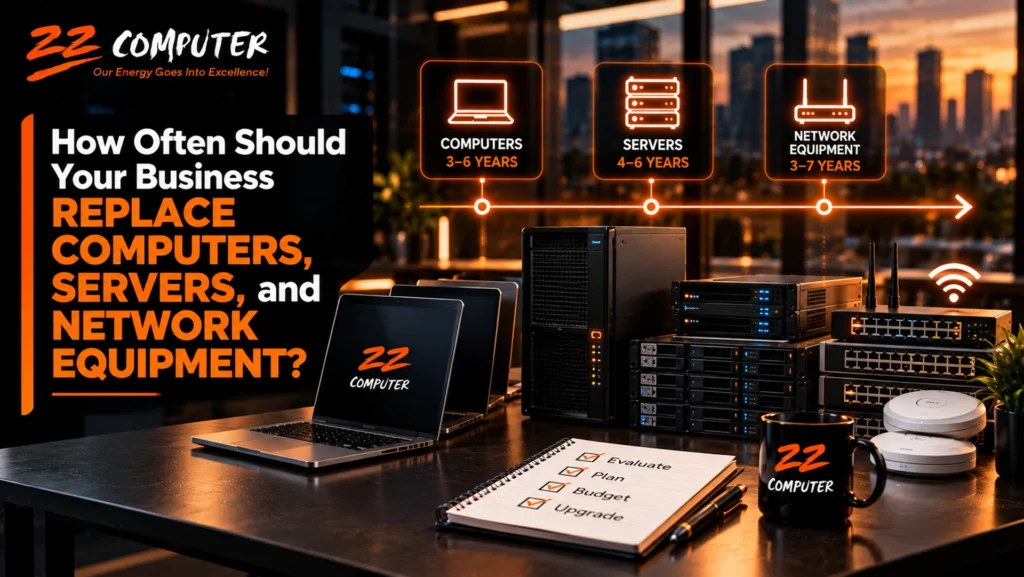
Technology is one of the most important investments a business makes, but knowing when to replace it is not always straightforward.
A computer may still turn on after seven years. A server may appear to be operating normally long after its warranty expires. Network equipment may continue working even though it no longer receives security updates.
Does that mean the equipment should stay in service?
Not necessarily.
The right time to replace business technology depends on more than age. Performance, reliability, security, software compatibility, manufacturer support, maintenance costs, and the importance of the equipment to daily operations all matter.
For small and mid-sized businesses, a planned technology replacement schedule can help prevent unexpected failures, reduce security risks, and make IT spending more predictable.
There is no universal replacement schedule that works for every organization. However, typical planning ranges can provide a useful starting point.
Equipment | Common Planning Range |
Business desktop computers | 4–6 years |
Business laptop computers | 3–5 years |
Physical servers | 4–6 years |
Firewalls and security appliances | 3–5 years |
Network switches | 5–7 years |
Wireless access points | 4–6 years |
Routers | 4–6 years |
These are general budgeting and review ranges, not mandatory replacement deadlines or guaranteed equipment lifespans.
Some equipment may remain suitable longer, while critical systems may need replacement sooner. Manufacturer support, security updates, warranty coverage, operating conditions, and business requirements should guide the final decision.
Desktop and laptop computers are among the most frequently replaced business technology assets.
Unlike servers and network infrastructure, employee computers are used directly throughout the workday. Slow performance, unreliable hardware, and software compatibility problems can affect productivity.
A computer that takes several minutes to start, struggles with normal business applications, or frequently freezes may be costing employees more time than management realizes.
However, poor performance does not always mean the entire computer needs replacement.
Sometimes upgrading memory, replacing a failing storage drive, removing unnecessary software, or correcting a configuration problem can extend the useful life of the device.
The decision should consider the cost of those improvements compared with the benefits of a newer computer.
Security support is one of the most important factors in determining whether a business computer should remain in service.
For example, Microsoft ended standard support for Windows 10 on October 14, 2025. Devices that remain on Windows 10 without applicable extended security coverage no longer receive the same ongoing security protection as supported Windows systems.
Businesses should evaluate whether older computers can run a supported operating system or whether replacement is the more practical option.
Continuing to use unsupported systems can expose an organization to avoidable security and compatibility risks.
Repeated hardware problems are another warning sign.
If a laptop frequently overheats, experiences battery problems, or requires recurring repairs, replacing it may be more economical than continuing to maintain it.
The same applies to desktops with failing components or recurring stability problems.
A planned replacement cycle helps businesses avoid having several aging computers fail around the same time.
Servers often support essential business applications, databases, file storage, authentication, and other services employees depend on.
Because of their importance, server replacement decisions should be approached differently from ordinary workstation upgrades.
A physical server may operate reliably for many years, but its risk profile changes as it ages.
Hardware warranties and support contracts eventually expire. Replacement components may become harder to obtain. New operating systems and applications may require capabilities older equipment does not provide.
Older servers may also become less efficient or less suitable for expanding workloads.
A server that is still functioning is not necessarily a server that should remain in production indefinitely.
A server should be evaluated when it experiences recurring hardware errors, performance limitations, insufficient storage capacity, increasing maintenance costs, or compatibility problems.
Expired manufacturer support is another important consideration, especially when the server runs applications essential to business operations.
Businesses should also examine whether the server has appropriate backup, recovery, and continuity arrangements.
If one hardware failure could interrupt the entire organization, the business may need to improve its recovery strategy as part of the replacement project.
Server replacement presents an opportunity to evaluate whether the business still needs physical infrastructure.
Depending on the applications involved, alternatives may include cloud-hosted servers, hosted business applications, or a combination of local and cloud services.
Cloud migration is not automatically the best or least expensive choice.
Businesses should compare ongoing costs, application requirements, security, performance, internet dependence, management responsibilities, and recovery needs before making that decision.
Network infrastructure often receives less attention than computers because employees rarely interact directly with it.
Yet switches, routers, firewalls, and wireless access points connect nearly everything in a modern business.
When network equipment fails, the consequences can extend well beyond one employee’s workstation.
Firewalls play an important role in protecting business networks and managing traffic between trusted and untrusted systems.
A firewall should be evaluated when its manufacturer stops providing security updates, its support subscription expires, its performance becomes inadequate, or its capabilities no longer meet business requirements.
Keeping a firewall operational without current security support can create unnecessary exposure.
Switches and routers may remain functional for many years, particularly in stable environments.
However, businesses should review them for reliability, performance, support availability, security updates, and compatibility with newer network requirements.
For example, an older switch may become a bottleneck when employees begin using faster network connections, new wireless equipment, or applications requiring greater bandwidth.
Replacement should be based on operational requirements and support status, not simply the equipment’s age.
Wireless technology continues to evolve, but businesses do not need to replace access points every time a new Wi-Fi standard becomes available.
A more practical approach is to evaluate coverage, connection stability, capacity, security, and compatibility with employee devices.
If employees frequently experience dropped connections, poor coverage, or congestion, the wireless infrastructure may need improvement.
Sometimes repositioning access points or correcting configuration problems is sufficient. In other situations, upgrading the equipment is the better long-term solution.
Businesses sometimes delay technology replacement because the equipment still works.
While extending equipment life can be financially sensible, waiting for failure can create costs that are not immediately visible.
Consider a company that depends on one aging server for its primary business application.
If that server fails unexpectedly, employees may lose access to important systems while replacement hardware is obtained, applications are reinstalled, and information is restored.
Even with reliable backups, recovery can take time.
The business may experience interrupted customer service, lost productivity, delayed transactions, and additional recovery expenses.
A planned replacement would not eliminate every possible failure, but it could reduce the likelihood of a predictable hardware problem becoming a business emergency.
Not every aging device needs to be replaced.
The right decision depends on the equipment’s condition, business importance, remaining support, and the cost of keeping it in service.
Repair may be appropriate when the equipment is relatively recent, manufacturer support remains available, and the problem is isolated.
Replacing a failed storage drive or correcting a software issue may restore a computer to reliable operation at a reasonable cost.
An upgrade may be worthwhile when the existing hardware remains dependable but needs additional memory, storage, or another supported improvement.
For example, a workstation that performs poorly because of insufficient memory may benefit from an upgrade without requiring complete replacement.
Replacement becomes more attractive when equipment is unsupported, repeatedly fails, cannot run required software, presents security concerns, or requires repairs that are difficult to justify financially.
Business-critical equipment deserves particular attention because the consequences of failure may be substantially greater than the replacement cost alone.
A replacement schedule helps organizations manage equipment as part of a long-term technology plan rather than responding to individual failures.
The first step is documenting the technology the business owns and depends on.
The inventory should identify important computers, servers, firewalls, switches, routers, wireless access points, and other relevant equipment.
Useful information includes the equipment model, purchase date, warranty status, operating system or firmware version, support expiration, assigned user or location, and business importance.
Equipment should be reviewed before its manufacturer stops providing support or security updates.
This is particularly important for operating systems, servers, firewalls, and other devices connected to critical business systems.
An inventory that includes support expiration dates allows management to plan replacements before those deadlines arrive.
Not every device needs to be replaced at the same time.
A business may decide to replace an unsupported firewall immediately while extending the use of a supported employee computer that continues to perform reliably.
Priorities should reflect the potential business impact of failure, security concerns, reliability, and the availability of replacement options.
Technology replacement should be part of the annual budgeting process.
Instead of purchasing equipment only when it fails, businesses can estimate upcoming replacement costs and distribute planned investments across several budget periods.
This can make technology spending more predictable and reduce the likelihood of unexpected large purchases.
A technology replacement schedule should be updated as equipment is purchased, replaced, reassigned, or retired.
It should also be reviewed when business requirements change, software vendors announce new requirements, or manufacturers publish support deadlines.
The objective is to maintain an accurate picture of the technology environment and its future needs.
Replacing technology also means properly retiring old equipment.
Computers, servers, and storage devices may contain confidential business information, customer records, employee data, financial documents, or saved credentials.
Before equipment is sold, recycled, donated, or discarded, the business should ensure that sensitive information is securely removed using an appropriate data-sanitization method.
Simply deleting files or performing a basic reset may not be sufficient for every device or storage technology.
Businesses should also update their equipment inventory, remove retired devices from management systems, and ensure that old equipment no longer has access to company accounts or networks.
Proper disposal is an important part of the technology replacement process.
Replacing business technology should not be based entirely on age, nor should every device remain in service until it fails.
The better approach is to evaluate equipment based on performance, reliability, security, manufacturer support, maintenance costs, and its importance to business operations.
A structured replacement schedule helps businesses avoid unnecessary purchases while reducing the risks associated with aging technology.
It also gives management a clearer understanding of future technology expenses, making it easier to budget for improvements and coordinate upgrades with business needs.
Most importantly, it allows technology decisions to be made proactively rather than under the pressure of an unexpected failure.
ZZ Computer helps small and mid-sized businesses in Los Angeles evaluate, maintain, and modernize their technology environments.
From employee computers and servers to firewalls, network infrastructure, and cloud services, ZZ Computer can help businesses identify aging equipment, evaluate replacement options, and develop practical technology upgrade plans.
Through managed IT services, network support, cybersecurity, and IT consulting, ZZ Computer helps organizations make informed decisions about technology investments while minimizing unnecessary disruption.
Is your business relying on aging computers, servers, or network equipment?
Contact ZZ Computer to discuss your current technology environment and develop a replacement strategy that supports your business needs and budget.
ZZ Computer
Website: https://zzcomputer.com
Email: info@zzcomputer.com
Phone: 310-826-6800
We firmly believe that the internet should be available and accessible to anyone, and are committed to providing a website that is accessible to the widest possible audience, regardless of circumstance and ability.
To fulfill this, we aim to adhere as strictly as possible to the World Wide Web Consortium’s (W3C) Web Content Accessibility Guidelines 2.1 (WCAG 2.1) at the AA level. These guidelines explain how to make web content accessible to people with a wide array of disabilities. Complying with those guidelines helps us ensure that the website is accessible to all people: blind people, people with motor impairments, visual impairment, cognitive disabilities, and more.
This website utilizes various technologies that are meant to make it as accessible as possible at all times. We utilize an accessibility interface that allows persons with specific disabilities to adjust the website’s UI (user interface) and design it to their personal needs.
Additionally, the website utilizes an AI-based application that runs in the background and optimizes its accessibility level constantly. This application remediates the website’s HTML, adapts Its functionality and behavior for screen-readers used by the blind users, and for keyboard functions used by individuals with motor impairments.
If you’ve found a malfunction or have ideas for improvement, we’ll be happy to hear from you. You can reach out to the website’s operators by using the following email
Our website implements the ARIA attributes (Accessible Rich Internet Applications) technique, alongside various different behavioral changes, to ensure blind users visiting with screen-readers are able to read, comprehend, and enjoy the website’s functions. As soon as a user with a screen-reader enters your site, they immediately receive a prompt to enter the Screen-Reader Profile so they can browse and operate your site effectively. Here’s how our website covers some of the most important screen-reader requirements, alongside console screenshots of code examples:
Screen-reader optimization: we run a background process that learns the website’s components from top to bottom, to ensure ongoing compliance even when updating the website. In this process, we provide screen-readers with meaningful data using the ARIA set of attributes. For example, we provide accurate form labels; descriptions for actionable icons (social media icons, search icons, cart icons, etc.); validation guidance for form inputs; element roles such as buttons, menus, modal dialogues (popups), and others. Additionally, the background process scans all of the website’s images and provides an accurate and meaningful image-object-recognition-based description as an ALT (alternate text) tag for images that are not described. It will also extract texts that are embedded within the image, using an OCR (optical character recognition) technology. To turn on screen-reader adjustments at any time, users need only to press the Alt+1 keyboard combination. Screen-reader users also get automatic announcements to turn the Screen-reader mode on as soon as they enter the website.
These adjustments are compatible with all popular screen readers, including JAWS and NVDA.
Keyboard navigation optimization: The background process also adjusts the website’s HTML, and adds various behaviors using JavaScript code to make the website operable by the keyboard. This includes the ability to navigate the website using the Tab and Shift+Tab keys, operate dropdowns with the arrow keys, close them with Esc, trigger buttons and links using the Enter key, navigate between radio and checkbox elements using the arrow keys, and fill them in with the Spacebar or Enter key.Additionally, keyboard users will find quick-navigation and content-skip menus, available at any time by clicking Alt+1, or as the first elements of the site while navigating with the keyboard. The background process also handles triggered popups by moving the keyboard focus towards them as soon as they appear, and not allow the focus drift outside of it.
Users can also use shortcuts such as “M” (menus), “H” (headings), “F” (forms), “B” (buttons), and “G” (graphics) to jump to specific elements.
We aim to support the widest array of browsers and assistive technologies as possible, so our users can choose the best fitting tools for them, with as few limitations as possible. Therefore, we have worked very hard to be able to support all major systems that comprise over 95% of the user market share including Google Chrome, Mozilla Firefox, Apple Safari, Opera and Microsoft Edge, JAWS and NVDA (screen readers), both for Windows and for MAC users.
Despite our very best efforts to allow anybody to adjust the website to their needs, there may still be pages or sections that are not fully accessible, are in the process of becoming accessible, or are lacking an adequate technological solution to make them accessible. Still, we are continually improving our accessibility, adding, updating and improving its options and features, and developing and adopting new technologies. All this is meant to reach the optimal level of accessibility, following technological advancements. For any assistance, please reach out to