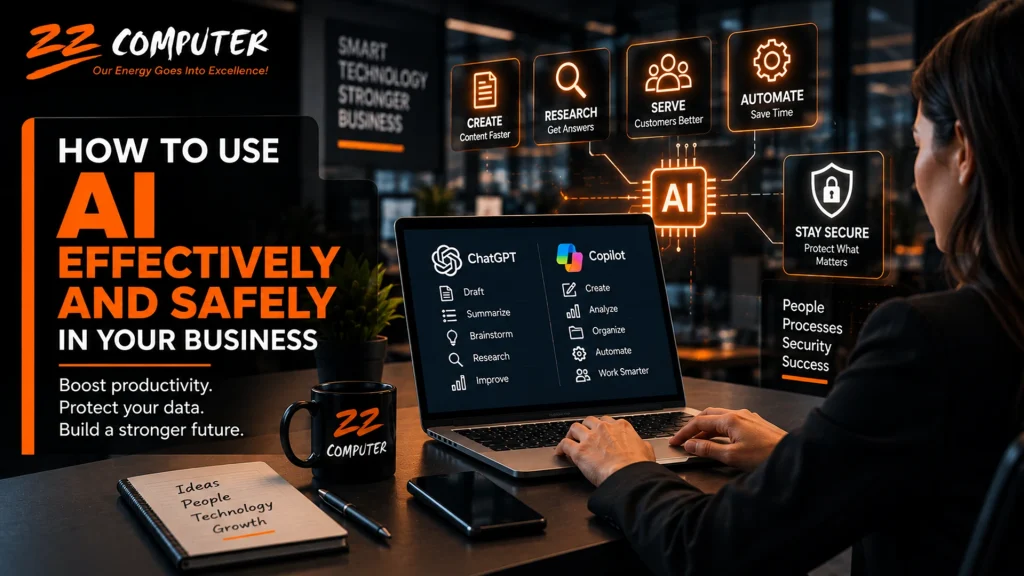
Artificial intelligence is quickly becoming part of everyday business.
Employees are using tools such as ChatGPT, Microsoft Copilot, and other AI assistants to draft emails, summarize documents, research topics, organize information, generate ideas, and automate repetitive work.
Used properly, AI can help employees work faster and spend less time on routine tasks.
But AI also creates a new challenge for business owners:
How do you take advantage of AI without creating unnecessary security, privacy, or accuracy risks?
The answer is not to prohibit AI completely or allow employees to use any AI tool they want without oversight.
Businesses need a practical middle ground built around approved tools, clear rules, employee training, appropriate security controls, and human review.
Generative AI is most useful when it supports employees rather than replacing their judgment.
One of the most common uses is drafting and improving business communications. Employees can use AI to create first drafts of emails, proposals, reports, internal announcements, customer responses, marketing content, meeting agendas, procedures, and documentation.
AI can help employees get started faster, but the final version should still be reviewed and revised before it is sent or published. Responsibility for the communication remains with the business.
AI can also be useful for research and information gathering. Employees can use it to understand unfamiliar topics, generate questions, compare concepts, organize information, or identify areas that need further research.
For example, an employee might ask AI what questions should be asked when evaluating a new software vendor, what should be included in an onboarding checklist, or what factors should be considered before making a technology purchase.
That can save time, but AI should not automatically be treated as an authoritative source.
Summarization is one of the most practical business uses for AI.
Employees can use AI to condense long reports, meeting notes, policies, technical documentation, email discussions, research material, and project updates.
This can help managers and employees quickly understand the main points of a document without reading every page before deciding what needs closer review.
Microsoft Copilot can be especially useful for organizations already working heavily in Microsoft 365 because it can help summarize and work with information across applications such as Outlook, Word, Teams, SharePoint, and OneDrive, depending on licensing and configuration.
The important point is that AI should make information easier to work with, not eliminate the need for employees to understand or verify important content.
AI can also assist employees with customer service by helping draft responses to common questions or organizing information employees use when assisting customers.
However, customer-facing AI content should receive additional review when it involves pricing, contracts, refunds, technical commitments, legal issues, or sensitive customer information.
AI and automation can also reduce time spent on repetitive administrative work such as organizing information, extracting action items from notes, creating checklists, reformatting documents, generating routine reports, or preparing first drafts of standard procedures.
These are often good places for businesses to begin because they can improve productivity without giving AI control over critical decisions.
One of the biggest risks with business AI use is employees entering sensitive information into tools without understanding how that information is handled.
Before using any AI platform for business information, employees should know whether the tool is approved by the company and whether it is appropriate for the type of information being entered.
Employees should be especially careful with passwords, login credentials, security codes, customer personal information, credit card data, banking information, payroll information, employee records, confidential contracts, internal financial reports, customer databases, proprietary business plans, and internal security information.
A simple rule works well:
If you would not intentionally place the information on a public website, do not enter it into an unapproved AI tool.
Even information that appears harmless on its own can become sensitive when combined with other details.
Businesses should not assume every AI website, app, browser extension, or chatbot provides the same privacy and security protections.
Consumer AI services and business-grade AI platforms may have very different controls.
Business versions of tools such as ChatGPT and Microsoft Copilot can provide organizational privacy, administrative controls, user management, and security features that may not exist in free or personal versions.
The specific product, account type, configuration, permissions, and company policy all matter.
This is why employees should not decide on their own that an AI tool is safe simply because it is popular or easy to use.
Employees are already experimenting with AI in many workplaces.
If the company does not establish clear rules, employees may create their own.
That can lead to inconsistent practices and unnecessary risk.
An AI usage policy should define which tools are approved, what information employees may enter, what types of tasks AI may be used for, and when human review is required.
For example, a business may allow AI for drafting, brainstorming, summarization, research assistance, and routine administrative work while requiring additional approval for financial decisions, legal commitments, hiring decisions, customer contracts, or security changes.
The exact policy will vary from one company to another, but employees should not have to guess.
One of the biggest mistakes employees can make is assuming that an AI-generated answer must be correct because it sounds polished.
AI can generate inaccurate, outdated, incomplete, or completely incorrect information while presenting it confidently.
That means important AI-generated information should always be verified.
Employees should confirm dates, calculations, statistics, names, technical instructions, regulatory information, quoted information, and references before relying on them.
For higher-risk decisions, AI should support human judgment rather than replace it.
A professional-looking answer is not necessarily a correct answer.
Businesses have dealt with Shadow IT for years, where employees use software or online services without the knowledge or approval of the IT department.
AI has created a similar problem known as Shadow AI.
Shadow AI occurs when employees use unapproved AI tools for business purposes.
An employee may create a personal AI account, install an AI browser extension, upload company files to a free service, connect an AI assistant to email, or use an AI meeting recorder without anyone in IT knowing about it.
The employee may simply be trying to work faster.
The problem is that the business may have no visibility into where its information is going, how long it is stored, or who can access it.
Shadow AI can create several problems at once.
Sensitive customer or company information may be uploaded to an unreviewed service. The business may not know how long prompts and files are retained. Personal accounts may not have centralized user management or account removal controls.
There can also be compliance concerns if employees process protected information using tools that have not been approved.
Another issue is ownership.
If an employee creates valuable AI workflows, prompts, or business processes inside a personal account, that information may leave with the employee when they leave the company.
This is why simply telling employees to “use AI carefully” is not enough.
Businesses need visibility, approved tools, and clear governance.
AI should fit within existing business and security procedures, not bypass them.
Employees should still follow multi-factor authentication requirements, password policies, access controls, backup procedures, software update policies, financial approval procedures, and management review processes.
If AI recommends changing a server setting, that change should still follow normal IT review and testing.
If AI drafts a financial report, the numbers should still be checked.
If a suspicious email arrives, employees should still follow the company’s phishing procedures.
AI should support existing processes rather than creating shortcuts around them.
Modern attacks are not limited to email.
AI-generated voices, images, and video can make impersonation more convincing.
A caller may appear to sound like an executive.
A message may closely imitate a trusted vendor.
A fake video or audio clip may create urgency around a payment or account request.
Businesses should therefore establish procedures for independently confirming unusual requests, particularly those involving money, passwords, sensitive information, or account changes.
Businesses should remember that cybercriminals use AI too.
AI can help attackers create more convincing phishing emails, imitate writing styles, generate fake images or audio, and automate social engineering.
That makes verification increasingly important.
Requests involving payments, banking changes, passwords, account access, sensitive files, or urgent instructions from executives should be independently confirmed when something seems unusual.
A message should not automatically be trusted simply because it looks professional or sounds like someone familiar.
There is no single AI platform that is right for every business.
The best choice depends on how employees work, what systems the company already uses, and what information the AI needs to access.
ChatGPT can be useful for writing, brainstorming, research, summarization, data analysis, document assistance, and general productivity.
Businesses planning broad employee use should consider whether a business-grade workspace makes more sense than having employees create unrelated personal accounts.
Centralized administration makes it easier to manage users, access, and company information.
Microsoft Copilot can be especially useful for organizations already using Microsoft 365.
Depending on licensing and configuration, Copilot can assist with information across Outlook, Word, Excel, PowerPoint, Teams, SharePoint, and OneDrive.
However, this makes existing permissions especially important.
If employees already have access to information they should not have, AI may make that information easier to find.
That is why businesses should review Microsoft 365 permissions before expanding AI access.
Specialized AI products are now available for accounting, marketing, customer service, project management, coding, sales, design, transcription, and many other business functions.
Before adopting them, businesses should review their privacy terms, data retention practices, administrative controls, permissions, integrations, security features, licensing, and compliance requirements.
Convenience should not be the only consideration.
Businesses do not need a complicated AI strategy to get started.
A practical approach begins by understanding how employees are already using AI.
Management should identify which tools are currently being used, what employees are using them for, and whether company information is being entered into unapproved services.
The next step is to select a limited number of approved tools that meet the company’s productivity and security needs.
The company should then establish an AI usage policy, review user permissions, provide employee training, and begin with lower-risk tasks such as drafting, summarization, brainstorming, and routine administrative work.
As employees gain experience, the company can evaluate which AI uses are actually improving productivity and which ones create more review work or security concerns than value.
AI can be an extremely useful business tool.
But productivity improves most when employees understand both what AI does well and where it can fail.
The strongest approach combines AI assistance, human judgment, security controls, and clear business procedures.
Employees remain responsible for protecting company information, verifying important facts, following security procedures, and reviewing work before it is used.
AI changes how work gets done.
It does not eliminate responsibility for doing that work correctly.
Businesses do not need to choose between adopting AI and protecting their information.
The two should be planned together.
ZZ Computer can help businesses evaluate AI tools, review Microsoft 365 environments, strengthen identity and access controls, reduce Shadow AI risks, and determine how AI can fit into existing IT and cybersecurity strategies.
ZZ Computer can also help organizations review how employees are currently using AI, choose appropriate business platforms, configure Microsoft 365 and Copilot more securely, improve account security, review permissions, and establish practical AI usage guidelines.
If your business is beginning to use ChatGPT, Microsoft Copilot, or other AI tools and you are unsure whether your current approach is secure, ZZ Computer can help you develop a practical AI strategy.
Call ZZ Computer at 310-826-6800 or contact us through the website to discuss secure AI adoption for your business.
We firmly believe that the internet should be available and accessible to anyone, and are committed to providing a website that is accessible to the widest possible audience, regardless of circumstance and ability.
To fulfill this, we aim to adhere as strictly as possible to the World Wide Web Consortium’s (W3C) Web Content Accessibility Guidelines 2.1 (WCAG 2.1) at the AA level. These guidelines explain how to make web content accessible to people with a wide array of disabilities. Complying with those guidelines helps us ensure that the website is accessible to all people: blind people, people with motor impairments, visual impairment, cognitive disabilities, and more.
This website utilizes various technologies that are meant to make it as accessible as possible at all times. We utilize an accessibility interface that allows persons with specific disabilities to adjust the website’s UI (user interface) and design it to their personal needs.
Additionally, the website utilizes an AI-based application that runs in the background and optimizes its accessibility level constantly. This application remediates the website’s HTML, adapts Its functionality and behavior for screen-readers used by the blind users, and for keyboard functions used by individuals with motor impairments.
If you’ve found a malfunction or have ideas for improvement, we’ll be happy to hear from you. You can reach out to the website’s operators by using the following email
Our website implements the ARIA attributes (Accessible Rich Internet Applications) technique, alongside various different behavioral changes, to ensure blind users visiting with screen-readers are able to read, comprehend, and enjoy the website’s functions. As soon as a user with a screen-reader enters your site, they immediately receive a prompt to enter the Screen-Reader Profile so they can browse and operate your site effectively. Here’s how our website covers some of the most important screen-reader requirements, alongside console screenshots of code examples:
Screen-reader optimization: we run a background process that learns the website’s components from top to bottom, to ensure ongoing compliance even when updating the website. In this process, we provide screen-readers with meaningful data using the ARIA set of attributes. For example, we provide accurate form labels; descriptions for actionable icons (social media icons, search icons, cart icons, etc.); validation guidance for form inputs; element roles such as buttons, menus, modal dialogues (popups), and others. Additionally, the background process scans all of the website’s images and provides an accurate and meaningful image-object-recognition-based description as an ALT (alternate text) tag for images that are not described. It will also extract texts that are embedded within the image, using an OCR (optical character recognition) technology. To turn on screen-reader adjustments at any time, users need only to press the Alt+1 keyboard combination. Screen-reader users also get automatic announcements to turn the Screen-reader mode on as soon as they enter the website.
These adjustments are compatible with all popular screen readers, including JAWS and NVDA.
Keyboard navigation optimization: The background process also adjusts the website’s HTML, and adds various behaviors using JavaScript code to make the website operable by the keyboard. This includes the ability to navigate the website using the Tab and Shift+Tab keys, operate dropdowns with the arrow keys, close them with Esc, trigger buttons and links using the Enter key, navigate between radio and checkbox elements using the arrow keys, and fill them in with the Spacebar or Enter key.Additionally, keyboard users will find quick-navigation and content-skip menus, available at any time by clicking Alt+1, or as the first elements of the site while navigating with the keyboard. The background process also handles triggered popups by moving the keyboard focus towards them as soon as they appear, and not allow the focus drift outside of it.
Users can also use shortcuts such as “M” (menus), “H” (headings), “F” (forms), “B” (buttons), and “G” (graphics) to jump to specific elements.
We aim to support the widest array of browsers and assistive technologies as possible, so our users can choose the best fitting tools for them, with as few limitations as possible. Therefore, we have worked very hard to be able to support all major systems that comprise over 95% of the user market share including Google Chrome, Mozilla Firefox, Apple Safari, Opera and Microsoft Edge, JAWS and NVDA (screen readers), both for Windows and for MAC users.
Despite our very best efforts to allow anybody to adjust the website to their needs, there may still be pages or sections that are not fully accessible, are in the process of becoming accessible, or are lacking an adequate technological solution to make them accessible. Still, we are continually improving our accessibility, adding, updating and improving its options and features, and developing and adopting new technologies. All this is meant to reach the optimal level of accessibility, following technological advancements. For any assistance, please reach out to