
Technology expenses can easily become reactive.
A computer fails, so a new one is purchased. A software subscription renews unexpectedly. Storage runs out. A cybersecurity problem leads to an emergency expense. Aging network equipment suddenly needs replacement.
When technology is managed this way, IT spending can seem unpredictable, even when many of those expenses could have been anticipated.
A small business IT budget provides a more structured approach. It helps a business plan for the technology needed to operate, protect critical systems and data, replace aging equipment, support employees, and prepare for future technology needs.
A useful IT budget should cover much more than computers and software licenses. It should reflect the complete technology environment that keeps the business operating.
A small business IT budget is a financial plan for the technology, services, security, maintenance, and support an organization expects to need during a specific period, typically a year.
The budget should account for both ongoing expenses and planned investments.
Ongoing expenses might include Microsoft 365 subscriptions, cloud services, managed IT support, cybersecurity tools, internet service, software licensing, and backup services.
Planned investments might include replacing aging computers, upgrading network equipment, implementing new business applications, or improving backup and disaster recovery capabilities.
The objective is not to predict every dollar the business will spend. It is to reduce surprises and make technology spending support the organization’s operational priorities.
Every organization is different, so there is no single IT budget that works for every small business.
A professional services firm with 15 employees may have very different technology requirements from a manufacturer, medical office, retailer, or company operating from several locations.
Computers are one of the most visible technology expenses, but they are only one part of the hardware budget.
Depending on the business, hardware expenses may include:
Businesses should plan for replacement rather than waiting for every device to fail.
A computer that is still functioning may nevertheless become increasingly difficult or expensive to support as hardware ages or operating system and software requirements change.
The important budgeting question is not simply whether a computer still works. Businesses should consider whether equipment remains reliable, secure, supported, and appropriate for the employee or business function that depends on it.
Software subscriptions can represent a substantial recurring IT expense.
The budget should account for operating systems, Microsoft 365, accounting applications, customer relationship management systems, industry-specific applications, productivity software, security tools, and other subscriptions employees rely on.
It is also useful to periodically review licensing.
Businesses sometimes continue paying for accounts assigned to former employees, duplicate applications that perform similar functions, or subscription levels that no longer match actual needs.
An annual IT budget review provides an opportunity to identify unnecessary costs while making sure employees still have the tools they need.
Cloud services have shifted many technology expenses from occasional purchases to recurring monthly or annual costs.
Microsoft 365, cloud storage, hosted applications, cloud servers, collaboration platforms, and other services should all be included in the technology budget.
Businesses should look beyond the subscription price itself.
The budget may also need to account for administration, security configuration, additional storage, data migration, backup, and ongoing support.
Moving technology to the cloud changes how infrastructure is purchased and managed, but it does not eliminate the need to budget for it.
Cybersecurity should be planned as a normal business technology expense rather than funded only after something goes wrong.
The appropriate investment depends on the organization’s systems, information, business operations, regulatory requirements, contractual obligations, and level of risk.
Cybersecurity expenses may include endpoint protection, email security, multi-factor authentication, security monitoring, vulnerability management, firewall protection, employee security awareness training, and professional cybersecurity support.
The objective is not to purchase every security product available. It is to understand the risks facing the business and invest in appropriate protection for its systems, users, and information.
For smaller businesses with limited resources, prioritization is particularly important. Security spending should address the risks that could have the greatest effect on the business.
Backup and disaster recovery should have a defined place in the IT budget.
Businesses should consider what information needs to be protected, where backups are stored, how long data needs to be retained, and how quickly critical information and systems would need to be restored following a problem.
Having backups is only part of the solution. A business also needs confidence that the correct information is being protected and can be recovered when needed.
Cloud information should be considered as well. Businesses increasingly store important information in Microsoft 365 and other cloud platforms, making data protection and recovery planning an important part of the overall technology strategy.
Depending on the organization, the budget might include cloud backup, server backup, offsite storage, disaster recovery services, and periodic recovery testing.
Technology requires ongoing management.
Businesses without a full internal IT department should budget for the people responsible for maintaining systems, helping employees, resolving technical problems, managing accounts, installing updates, monitoring systems, and planning improvements.
That may mean internal IT staff, an outside managed IT provider, or a combination of the two.
IT support should also include more than responding when something breaks.
Proactive technology management can include monitoring, maintenance, security, documentation, account management, technology planning, and identifying potential problems before they cause significant disruption.
Including these services in the budget makes IT support a planned operating expense rather than a series of unexpected repair bills.
The network is easy to overlook until employees cannot connect to it.
The IT budget should consider the infrastructure connecting employees to business systems and the internet, including firewalls, switches, wireless access points, cabling, internet service, and remote connectivity.
Businesses that depend heavily on internet access should also consider what would happen during an outage.
If losing internet access would prevent employees from working, interrupt customer service, or make important applications unavailable, additional connectivity or another continuity option may be worth considering.
The appropriate investment depends on how dependent the organization is on its network and internet connection.
Hiring an employee often creates technology expenses that extend beyond purchasing a computer.
A new employee may require a laptop or desktop, monitor, Microsoft 365 license, application licenses, security software, email account, cloud access, and technical setup.
Those costs can become significant when a company is growing.
Employee departures also require IT work. Accounts may need to be disabled, company information preserved, licenses reassigned, equipment recovered, and access to systems and data removed.
Businesses expecting staffing changes during the coming year should include these requirements in the IT budget rather than treating each change as an unexpected expense.
An IT budget should not only maintain today’s technology. It should also consider where the business is going.
A company may be planning to add employees, open another location, move applications to the cloud, replace an important business system, introduce new software, improve remote-work capabilities, or expand its data storage.
These changes often have technology costs.
Identifying upcoming projects during the budgeting process allows management to estimate those expenses, determine priorities, and decide when investments should occur.
This also prevents the IT budget from becoming entirely focused on maintaining existing systems. Technology spending can also support improvements that make the organization more efficient, secure, scalable, or resilient.
Even a carefully planned IT budget cannot anticipate everything.
Hardware can fail earlier than expected. A vendor can change pricing. A critical application may require an unexpected upgrade. A cybersecurity incident may require professional assistance.
Businesses should therefore maintain some flexibility for unplanned technology expenses.
The appropriate amount will vary significantly by organization.
A business operating relatively new, standardized equipment with well-managed systems may face different risks from one relying on aging servers, unsupported applications, or equipment that would be expensive to replace suddenly.
Rather than selecting an arbitrary amount, the contingency portion of the budget should reflect the organization’s actual technology environment and risks.
Business owners sometimes ask what percentage of revenue they should spend on IT.
Industry benchmarks can provide context, but a percentage alone does not determine what a particular business needs.
Two companies with similar revenue can have completely different technology environments.
One might operate primarily from a few cloud applications. Another might maintain servers, specialized software, multiple locations, large amounts of sensitive data, and extensive cybersecurity requirements.
A more useful approach is to begin with the technology the business actually depends on and determine:
This creates a budget based on actual requirements rather than an arbitrary spending percentage.
Most small businesses have more potential technology improvements than they can reasonably fund at one time.
That makes prioritization important.
Technology risks can help determine where available funds should go first. Aging equipment, security weaknesses, unreliable backups, unsupported software, network problems, or other vulnerabilities may deserve attention before less critical improvements.
For example, replacing several employee computers may be desirable, but resolving a serious backup problem could be considerably more important if critical business data cannot currently be recovered.
Risk-based budgeting helps distinguish between technology improvements that would be useful and problems that could materially affect business operations.
One of the easiest ways to make IT spending more predictable is to maintain an inventory and replacement schedule.
Instead of discovering that many computers need replacement at the same time, a business can identify aging equipment in advance and plan future spending accordingly.
A replacement schedule does not mean every device must automatically be replaced when it reaches a particular age.
Equipment should be evaluated based on factors such as reliability, performance, warranty status, security support, software compatibility, business importance, and replacement cost.
The same planning can be applied to servers, firewalls, networking equipment, and other important infrastructure.
Knowing what equipment the business has and approximately when it may need attention can make future technology expenses much easier to manage.
An IT budget should not disappear into a spreadsheet after it is approved.
Technology requirements change.
Employees join or leave. Software vendors change licensing or pricing. Equipment fails. Security requirements evolve. Business priorities shift. New projects emerge.
Reviewing the budget periodically allows management to compare planned spending with actual spending and adjust upcoming priorities.
It also creates an opportunity for business management and IT support to discuss technology requirements before decisions become emergencies.
A useful small business IT budget is ultimately a technology plan expressed in financial terms.
Instead of asking only, “How much did we spend on IT last year?” businesses should also ask:
What technology will our business need to operate securely, reliably, and effectively during the coming year, and what should we plan to invest in it?
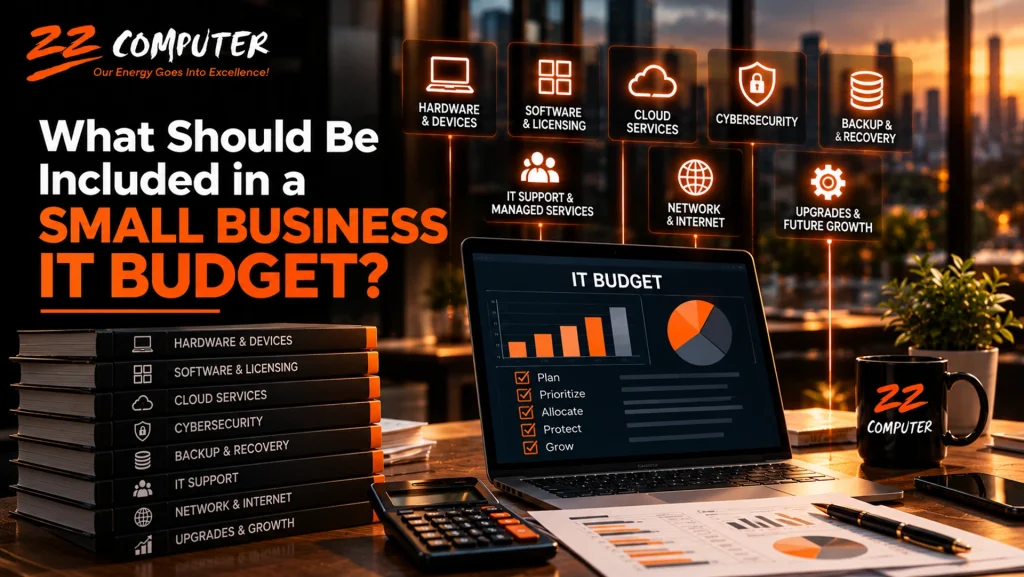
By accounting for hardware, software, cloud services, cybersecurity, backups, IT support, networking, staffing changes, future projects, equipment replacement, and unexpected expenses, businesses can make technology spending more predictable and align it with actual operational needs.
ZZ Computer helps small and mid-sized businesses evaluate their existing technology, identify priorities, and develop practical plans for maintaining and improving their IT environments.
That can include reviewing hardware and replacement needs, Microsoft 365 and cloud services, cybersecurity, backup and disaster recovery, network infrastructure, IT support requirements, and technology risks that may need attention during the coming year.
Rather than approaching technology one unexpected expense at a time, ZZ Computer can help your business develop an IT strategy that connects technology priorities with operational needs and budget.
Call ZZ Computer at 310-826-6800 or visit the ZZ Computer website to discuss managed IT services, IT consulting, cybersecurity, backup and recovery, or technology planning for your business.
We firmly believe that the internet should be available and accessible to anyone, and are committed to providing a website that is accessible to the widest possible audience, regardless of circumstance and ability.
To fulfill this, we aim to adhere as strictly as possible to the World Wide Web Consortium’s (W3C) Web Content Accessibility Guidelines 2.1 (WCAG 2.1) at the AA level. These guidelines explain how to make web content accessible to people with a wide array of disabilities. Complying with those guidelines helps us ensure that the website is accessible to all people: blind people, people with motor impairments, visual impairment, cognitive disabilities, and more.
This website utilizes various technologies that are meant to make it as accessible as possible at all times. We utilize an accessibility interface that allows persons with specific disabilities to adjust the website’s UI (user interface) and design it to their personal needs.
Additionally, the website utilizes an AI-based application that runs in the background and optimizes its accessibility level constantly. This application remediates the website’s HTML, adapts Its functionality and behavior for screen-readers used by the blind users, and for keyboard functions used by individuals with motor impairments.
If you’ve found a malfunction or have ideas for improvement, we’ll be happy to hear from you. You can reach out to the website’s operators by using the following email
Our website implements the ARIA attributes (Accessible Rich Internet Applications) technique, alongside various different behavioral changes, to ensure blind users visiting with screen-readers are able to read, comprehend, and enjoy the website’s functions. As soon as a user with a screen-reader enters your site, they immediately receive a prompt to enter the Screen-Reader Profile so they can browse and operate your site effectively. Here’s how our website covers some of the most important screen-reader requirements, alongside console screenshots of code examples:
Screen-reader optimization: we run a background process that learns the website’s components from top to bottom, to ensure ongoing compliance even when updating the website. In this process, we provide screen-readers with meaningful data using the ARIA set of attributes. For example, we provide accurate form labels; descriptions for actionable icons (social media icons, search icons, cart icons, etc.); validation guidance for form inputs; element roles such as buttons, menus, modal dialogues (popups), and others. Additionally, the background process scans all of the website’s images and provides an accurate and meaningful image-object-recognition-based description as an ALT (alternate text) tag for images that are not described. It will also extract texts that are embedded within the image, using an OCR (optical character recognition) technology. To turn on screen-reader adjustments at any time, users need only to press the Alt+1 keyboard combination. Screen-reader users also get automatic announcements to turn the Screen-reader mode on as soon as they enter the website.
These adjustments are compatible with all popular screen readers, including JAWS and NVDA.
Keyboard navigation optimization: The background process also adjusts the website’s HTML, and adds various behaviors using JavaScript code to make the website operable by the keyboard. This includes the ability to navigate the website using the Tab and Shift+Tab keys, operate dropdowns with the arrow keys, close them with Esc, trigger buttons and links using the Enter key, navigate between radio and checkbox elements using the arrow keys, and fill them in with the Spacebar or Enter key.Additionally, keyboard users will find quick-navigation and content-skip menus, available at any time by clicking Alt+1, or as the first elements of the site while navigating with the keyboard. The background process also handles triggered popups by moving the keyboard focus towards them as soon as they appear, and not allow the focus drift outside of it.
Users can also use shortcuts such as “M” (menus), “H” (headings), “F” (forms), “B” (buttons), and “G” (graphics) to jump to specific elements.
We aim to support the widest array of browsers and assistive technologies as possible, so our users can choose the best fitting tools for them, with as few limitations as possible. Therefore, we have worked very hard to be able to support all major systems that comprise over 95% of the user market share including Google Chrome, Mozilla Firefox, Apple Safari, Opera and Microsoft Edge, JAWS and NVDA (screen readers), both for Windows and for MAC users.
Despite our very best efforts to allow anybody to adjust the website to their needs, there may still be pages or sections that are not fully accessible, are in the process of becoming accessible, or are lacking an adequate technological solution to make them accessible. Still, we are continually improving our accessibility, adding, updating and improving its options and features, and developing and adopting new technologies. All this is meant to reach the optimal level of accessibility, following technological advancements. For any assistance, please reach out to